


Hello. This is Ochiai, the designer.
I recently changed phones and finally got the red iPhone 7 Plus I'd been wanting.
Red is my favorite color, so I knew I had to buy it and put in a reservation.
Since I often view documents on my phone, I went with a Plus model for the first time. It's big and so easy to see! Flying the drone is comfortable too (*^_^*)
So, in this blog post I'd like to talk about iPhone features I've found handy while using it—though they have nothing to do with design.
① "Wallet"
The feature I use most is "Wallet," which lets you register all your cards in one place.
You can manage credit cards, Suica, boarding passes, prepaid cards, movie tickets, and more.
Since fingerprint authentication is required to actually pay with a credit card registered on the iPhone, there's no worry about someone else using it.
It has really cut down the time spent at checkout! It's a huge help when you're in a hurry.
"The screen lights up without pressing the Home button!"
Fingerprint authentication has evolved so much that even a light touch unlocks the phone. "But I only wanted to check the time or my notifications…"—that happened to me a lot.
However, you can wake the phone and check notifications and the time without touching the button!
It's easy. Just pick up your iPhone and tilt it toward you—as if angling it so you can see the screen.
You can also light it up by flipping it over from face down to face up.
But then I thought, if it's in my bag it might keep turning on and off by itself, causing false operations and wasting battery…
In that case, just go to "Settings" on your iPhone, then "Display & Brightness," and turn off "Raise to Wake"!
By the way, from "Display & Brightness" you can also change the boldness and size of the text (*^_^*)

③ "3D Touch"
Rather than a long press, this feature works by pressing one level deeper.
It's been around for a while, but now it can also be used in Control Center. (See the image)

Of course, it works with apps too (*^_^*)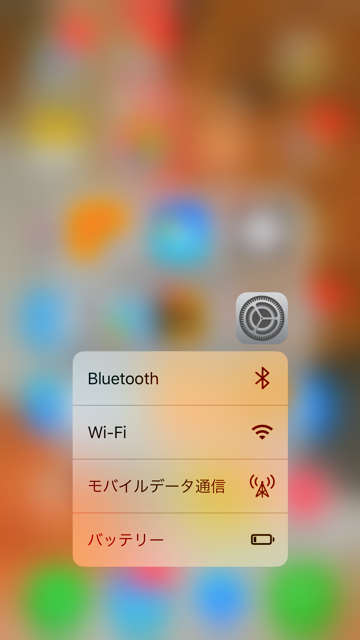
④ "Caps Lock"
This isn't limited to the iPhone 7. Still, I'd always found it inconvenient, wondering whether you could use caps lock like on a computer…
When I wanted to type everything in capitals, I thought I'd have to press the shift ↑ key every single time—but if you quickly tap shift twice, it locks!
Well, I had no idea… Maybe I was the only one who didn't know? But for anyone else who was in the dark, I hope you can quietly learn it here (lol)
⑤ "Swipe left to launch the camera even on the lock screen"
I use this a lot! Tilt to wake, then swipe left to launch the camera!
Recommended for when you just want to open the camera or take a photo right away ♪
That's it! Just a few of them, but there's my introduction to handy iPhone features.
Personally, I'm impressed with the new camera features, but I'll save that for next time (lol)


