


Hello. This is Ochiai, the designer.
In this blog post, I'd like to introduce AirDrop, which makes exchanging data between Apple devices incredibly easy.
So what exactly is AirDrop, anyway??
AirDrop is a feature that lets you easily send and receive photos, data and more between Apple devices such as iPhones and Macs.
It's a bit like the infrared transfer everyone used back in the feature phone days.
Let's try using AirDrop on an iPhone right away!
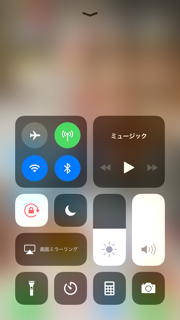
① Swipe up from the bottom of the screen to open Control Center.
Make sure Wi-Fi and Bluetooth are turned ON.
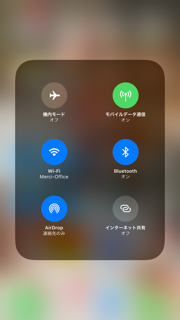
Once it's open, press firmly on the square area containing Wi-Fi and Airplane Mode to use 3D Touch.
② The hidden AirDrop option then appears. Simply tap AirDrop.
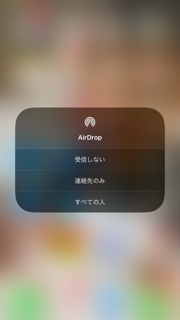
③ The AirDrop receiving settings appear, so choose the option you want. You can always change the setting later, so for now select Everyone.
With this setting, when someone sends you data such as photos via AirDrop, a notification asking whether to accept or decline the data appears on your screen.
If you choose Accept, you can receive it.
③ To send photos from your device using AirDrop
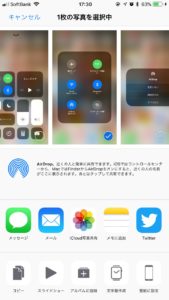
Tap this icon,

and the users you can send to are shown in the AirDrop section, so tap the person you want to send to.
That's how easily you can send photos to someone.
Can AirDrop only share photos?
Not at all. In addition to photos and, of course, videos, you can share map data, contacts, App Store apps, and website URLs. It only works between Apple devices, but it's an extremely handy feature, so why not give it a try?


