










Website edits do not have to be handled by the company that built the site. If your site was built with WordPress, another company can often take it on, after first checking the current state of the site. When you make a request, explain three things with a screenshot: where you want the change, what you want changed, and by when. That makes the work fast and accurate.
You can request website edits even from a different production company
Even if you cannot reach the company that built your site, the person in charge has left, or you have no idea who built it in the first place, you do not have to give up on making edits.
It is perfectly fine for the company that built your website and the company you ask for edits to be different. What matters is how the site is built.
- If it is built with WordPress, another company can often take it on
- If it is built on a proprietary system, sometimes only the company that built it can touch it
- If it is hand-coded HTML, edits may be possible as long as you have the complete set of files
If your site was built with WordPress, we can take over its maintenance even if another company created it. We begin by checking the current state of the site.
You can check whether your site runs on WordPress from the admin login page. Add "/wp-admin" to the end of your site's URL and open it; if the WordPress login screen appears, the site was built with WordPress.
There is information to gather before requesting edits
To make the request go smoothly, please check the following information in advance.
- The site URL
- The credentials needed to log in to the admin screen (as far as you know them)
- The server provider and its admin login details (as far as you know them)
- A screenshot of the area you want changed (a smartphone screenshot is fine)
- A note describing what you want changed, as specifically as possible
You can still consult us even if you do not know the login details. In some cases we can work through the steps together, such as tracking down your server provider or reissuing a password.
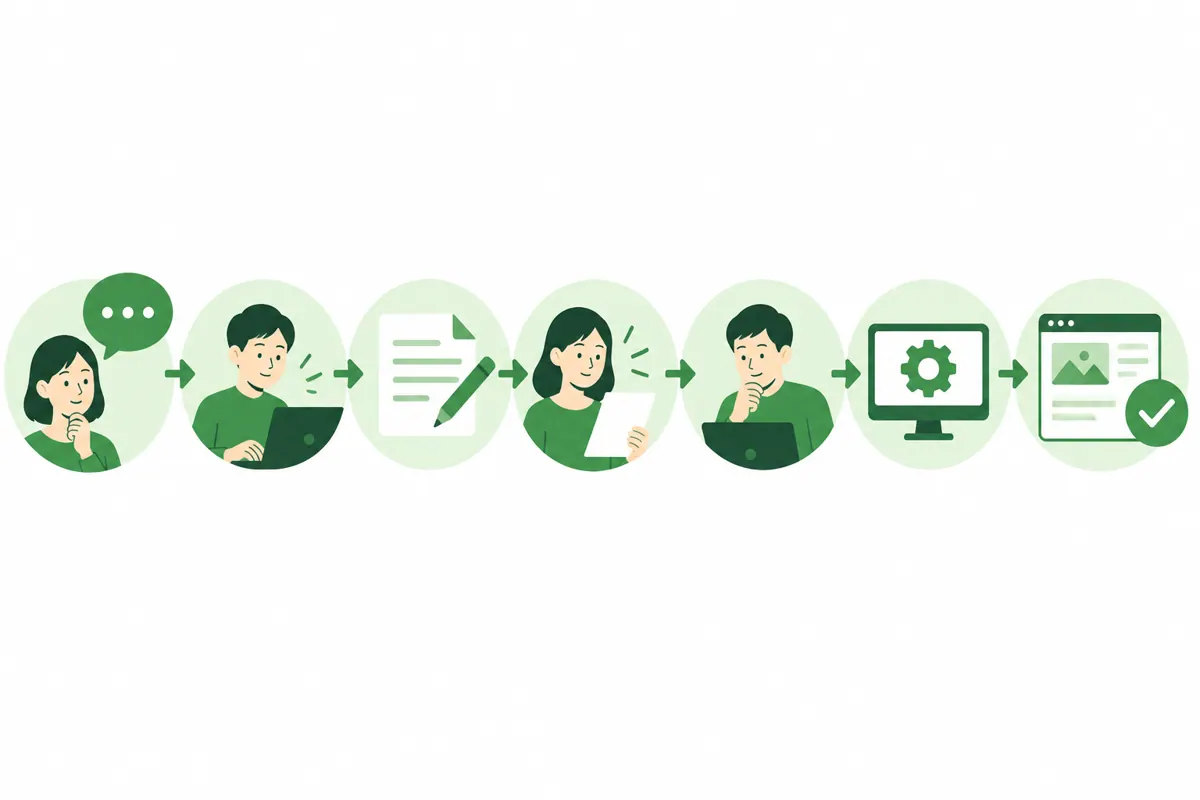
Edit requests proceed in these steps
Here is the general flow of an edit request, in seven steps.
- Tell us what you want changed
- Have the current state of the site checked
- Receive an estimate covering the work, cost and timeline
- Agree on the details and confirm the request
- Make the changes somewhere other than the live site and verify they work
- Review the changes and publish them to the live site
- Check how the site displays after publishing
Step 5, making the changes somewhere other than the live site, is the key to editing safely. If you rewrite a published site directly, a mistake leaves your customers looking at a broken page. Checking the work elsewhere before publishing avoids that kind of accident.
Also check whether there is a way to roll back one change at a time after publishing. Being able to return to the previous state immediately if a problem appears gives you peace of mind.
Describe edits with three things: location, content and deadline
The most common misunderstanding in edit requests is failing to convey "what should be changed, and how." Writing it as follows gets the message across accurately.
| Item | Poor example | Good example |
|---|---|---|
| Location | The company profile part | The third row from the top of the table on the Company Profile page |
| Details | Please change the address | Please change 1-2-3 XX-cho to 4-5-6 XX-cho |
| Deadline | As soon as possible | Please publish it by the relocation date on the 1st of next month |
Marking the screenshot with red circles or arrows makes it even clearer.
When changing text, please provide the revised wording in a form that can be copied as is. When replacing an image, attach the new image file.
Effort and cost vary by the type of edit
The scale of the work differs greatly depending on what is being changed.
| Type of edit | Example | Approximate effort |
|---|---|---|
| Replacing text or photos | Changing business hours, swapping staff photos | Low |
| Adding news items or case studies | Publishing a new project case study | Low |
| Adding pages | An introduction page for a new service | Moderate |
| Design changes | Changes to colors, typefaces, text size, spacing and layout | High |
| Adding features | Booking forms, multilingual support | High |
We handle small edits such as text, images, links, and adding or deleting content within existing fields as part of the monthly plan. Adding pages, or design changes such as colors, typefaces, text size, spacing and layout, are quoted separately according to the scope.

Common mistakes when requesting edits
The request is unclear, so it takes many rounds of back and forth
A request like "make it look nice" invites differing interpretations. Explain the location, the content and the deadline, with a screenshot.
The site stays on an old version and the list of fixes grows
If WordPress core and plugin updates have stopped, the display can break during editing. Having the update status checked at the same time as the edits prevents trouble.
Starting edits without a backup
If something goes wrong during editing, you cannot go back. Always confirm that a backup is taken before the work begins.
Needing an estimate and a contract for every small edit
Getting a quote every single time costs both effort and time. If you expect to request small edits on an ongoing basis, a monthly plan that covers a set scope of work suits you better.
Requesting edits only and neglecting maintenance
If WordPress updates are neglected, the display can break and security weaknesses can remain. There are cases where an expired SSL certificate or a server problem went unnoticed and the site became unviewable. It is safer to request edits and maintenance together.
How to choose who to ask
Who you should ask for edits depends on your situation.
| Situation | Suitable choice |
|---|---|
| You can reach the company that built the site | Consult the company that built it first |
| You cannot reach the company that built the site | A company that offers WordPress maintenance |
| You can handle simple updates yourself | Ask a specialist company only for the difficult parts |
| You need edits frequently | A company that accepts edits on a monthly plan |
| You are not sure what needs fixing | A company you can consult starting with a diagnosis |
With Merci Ltd.'s edit and maintenance service, you simply send your request by chat or LINE, and we verify the change before publishing it. Daily backups, weekly updates of WordPress core and plugins, and daily morning monitoring are all included, so you can leave everything to us.
Common situations that call for edits
Edit requests most often come up in situations like these.
- Changes to the address, phone number or business hours
- Revisions to the price list
- Staff changes or photo replacements
- Adding a new service or campaign
- Adding news items or project case studies
- Deleting outdated pages
- Fixing a broken layout on smartphone screens
Items 1–3 only require swapping text and images, and can usually be published in a short time. Items 4 and 6 affect the page structure, so an estimate may be required.
Example of a request message
When you send a request by chat or LINE, writing it like this gets everything across in one message.
- The target page (e.g. the Company Profile page)
- The spot to change (e.g. "Address" in the third row of the table)
- The current wording and the revised wording
- The date you want it published
- A screenshot
Sending this message reduces the back and forth needed for confirmation. The key is to attach the revised wording in a form that can be copied.
What to check after requesting edits
Once you are told the change is live, check these four points with your own eyes.
- Whether the changed area displays correctly on both computer and smartphone
- Whether the text and images before and after the changed area are still intact
- Whether the contact form still submits as usual
- Whether the phone number link can be tapped to place a call
If there is a problem, contact us right away. If there is a way to roll back one change at a time, it can be handled calmly.
When an urgent fix is needed
If your site suddenly becomes unviewable or the layout breaks badly, treat it separately from a normal edit and contact us immediately. Tell us these three things.
- When it started
- Which screen it affects and how it looks (attach a photo if you have one)
- Anything you did yourself just before it happened
The cause is usually delayed updates, a server problem or an expired SSL certificate. With a maintenance plan that includes daily morning monitoring, we can often notice before your customers do.
FAQ
That is not a problem. If the site was built with WordPress, another company can usually take it on. We start by checking the current state of the site.
Yes, you can. In some cases we work through the steps together, such as tracking down your server provider or reissuing a password.
We review the details of your request and verify the change before publishing it. The number of days until it goes live depends on what is being changed.
We quote based on the size of the site, its current condition, and the scope of work you entrust to us. Please get in touch with us first.
You may request edits only. That said, WordPress tends to develop problems when left unattended, so we recommend requesting maintenance along with it.
Start by letting us check the current state of your site
Website edits can be requested even from a company other than the one that built the site. To begin, let us know what you want changed and your site's URL.
After reviewing your current site, we will explain how to proceed with edits and maintenance.