


Hello. This is Ochiai.
Today I'd like to talk about a piece of software called CLIP STUDIO.
This software is made for people who draw—specifically for illustration, animation, and manga.
At first I also drew with Photoshop, another paint-type software, but now I mainly use CLIP STUDIO.
It's a bit embarrassing to admit, but I only learned that you could draw digitally within the past few years, and at first I was completely lost. That's exactly why this will be information for people who are interested but don't really understand it—so let me explain a little about this software with some images. (The images used here were made by me, but they are fan art featuring Sora and Biyomon, characters from the anime Digimon.)
About brushes
First, the most important thing: brushes. If these feel different from analog tools, you end up thinking, "Somehow I just can't draw well."
If you want to draw in Photoshop, you have to configure the brush settings yourself.
For beginners, that's a very high hurdle.
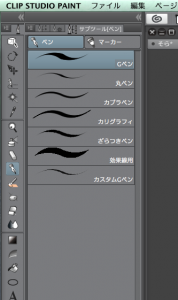
But CLIP STUDIO comes with a wide variety of brushes right from the start—G-pens, pencils, oil-painting brushes, even watercolor brushes—and if you use a pen tablet with pressure sensitivity, you can draw lines with variation in thickness just like with analog tools.

Just like Photoshop, it naturally has layer functions, so it's easy to first sketch with a pencil and then ink the line art with an inking brush. (In the image, the opacity of the sketch layer has been lowered so it's faint while inking.)


Layers can also be hidden, which saves you the trouble of erasing the sketch with an eraser afterward as you would with analog art.
Erasers can also be chosen to suit your purpose—whether you want to erase smoothly or erase cleanly—and with brushes that blend colors, such as watercolor brushes, you can paint while intuitively mixing colors.
The fill tool is excellent too. After filling an area with the fill tool, you can use the "fill remaining" tool to quickly fill in any spots you missed. It fills everything beautifully, just like in the image!


As you can see, it's packed with features that artists will love, and it can dramatically cut down your working time.
There are panel-layout tools for manga, tools for drawing perspective, and of course you can draw shapes as well.
Free brushes and materials are also distributed for CLIP STUDIO users, so you can customize it in all sorts of ways to suit your needs.
As for file formats, you can save not only in CLIP STUDIO's own format but also export in Photoshop format, so I imagine many people finish up by editing in Photoshop. (Photoshop really is superb when it comes to retouching.)


Here is the image after the final editing in Photoshop.
It is paid software, but it comes highly recommended for anyone who wants to draw digital art with an analog feel!
This one was also created in CLIP STUDIO — Sasuke and Sakura from NARUTO.


As you can see, you can draw anime-style illustrations too. Coloring books for adults are popular these days, so why not give digital illustration a try as well?


